
Glossary
Avatar

An avatar is a way of sharing an image of yourself on websites, blogs and forums.
We use avatars on the site so you can see who you're playing your matches against (toepoke.co.uk has an appalling memory). We use another site to manage our avatars.
For more information, and to create your own avatar to use on toepoke, visit en.gravatar.com. Once you've signed up, remember to come back and tell us what it is.
Bench
When setting the sides for your match you may find you've got too many players, in which case you can leave some on the bench.
If one of your players drops out, you can promote someone from the bench to take the spare place.
Block Booking
Unless you play down your local park, you have to pay to use the facilities of a venue.
Normally you ring up each week and book a pitch. Sometimes though you can book a pitch for a set number of weeks. This is a block booking.
Bookmark
Most internet browsers have a place where you can bookmark toepoke.co.uk, making it easy to find.
Community Venues
As well as venues from Google places you can also pick a venue submitted by our community.
These venues haven't been verified and we'd recommend you conduct additional research before using them.
Confirmed
When someone creates an account on toepoke they receive an email to confirm their email address.
This is so we can be certain it's a real email address, and the person who signed up is the owner of the email address. This helps reduce the chances of toepoke being classified as a spammer.
If someone fails to confirm their account, their activity is limited. They won't receive invites to matches for instance.
Collector
Deadline
Some venues allow a grace period before your match kicks off when you can cancel your booking without incurring a fee. In toepoke.co.uk, we refer to this as the deadline.
When your deadline is hit (see your match dashboard for when this happens) we'll send your manager an e-mail saying how many players you have in case you need to cancel the match.
In addition, once the deadline has passed we'll tell the manager(s) whenever someone drops out, or puts their name down. That way you can keep on top of things.
Diary
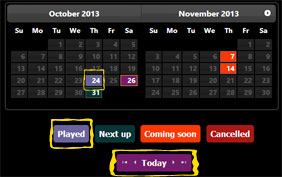
The diary shows all the matches you have coming up, ones you've played and any that have been cancelled.
Play 2, 3 times a week? All your matches are shown in one convenient place.
Direct Debits
Fed up of collecting £5 off 10 people every week? Who's paid, who hasn't, who's paying tomorrow, who wants a PayPal link ...
Ease the pain by collecting your player's share of the pitch with Direct Debit payments.
Direct Debits aren't just for paying your monthly bills. toepoke, together with our partner, GoCardless will collect each player's share from their bank account and transfer it to you*
*Each player will have additional fees applied. You receive the full pitch share cost.
This feature is yet to be completed.
Direct Debit Fees
Paying by Direct Debit does incur additional fees over an equivalent cash payment.
The following table gives an illustration of what these additional costs may look like:
| Pay By Cash | Pay By Direct Debit | |||||||
|---|---|---|---|---|---|---|---|---|
| Pitch hire | Number players | Player's share | You receive | Admin Fee | GoCardless Fee | Player pays | You receive | |
| £50.00 | 8 | £6.25 | £6.25 | £0.30 | £0.27 | £6.82 | £6.25 | |
| £50.00 | 10 | £5.00 | £5.00 | £0.30 | £0.25 | £5.56 | £5.00 | |
| £50.00 | 12 | £4.17 | £4.17 | £0.30 | £0.24 | £4.72 | £4.17 | |
The following table gives an illustration of what these additional costs may look like when your venue costs £50.00.
| Number players | Player's share | Player pays | You receive |
|---|---|---|---|
| 10 | £5.00 | £5.56 | £5.00 |
- toepoke charges an administration fee of £0.30.
- The GoCardless fee is variable - see GoCardless pricing for full details.
Prices correct at time of publication (1st, September 2019). Review current pricing at GoCardless.
This feature is yet to be completed.
Direct Debit Mandate
A Direct Debit mandate is where you provide GoCardless with authorisation to collect your share of the pitch cost and pay it to whoever pays for the pitch.
All payments are covered by the Direct Debit Guarantee.
This feature is yet to be completed.
Directory
Our directory lists any public squads and are accepting requests for more players.
Email Preferences
toepoke.co.uk was designed to tell you all you need to know to give you the best chance of your match going ahead. However this can result in a few e-mails being sent to you through the week (particularly for managers who need to be kept in-the-loop).
If you find you're getting more e-mails than you'd like, you can change your e-mail preferences:
All (default)
As it says on the tin ... all the e-mails you get now you will continue to get.
Some
Only some of the existing notifications will be sent. For example you won't get an email saying you've put your name down, and managers won't be told when someone removes themselves from the squad.
None
We'll stop sending you any e-mails until you update your preferences again. Useful if you're going on holiday.
Preferences only refer to e-mails for organising your matches. You will still receive other website management e-mails like password resets (otherwise how would you reset your password 😉).
Frequency
Whether you play every week, every month or even the 3rd Friday of every month toepoke.co.uk will work out the best way to manage your matches.
Flat Football
At the end of a season the Flat Football award is presented to the player with the least points.
It's the toepoke equivalent of a wooden spoon 😊.
Floaters
toepoke uses e-mail extensively to communicate between you, your squad and your players.
Sometimes e-mail isn't practical for some. They may not have access to e-mail at work, or they may not be internet savvy, or just too stubborn to help you lose the faff!
For these players you can add them as a floater who are added to your squad by a manager. From then you can add them into matches on their behalf.
Future Matches
Golden Boot
At the end of each season the player with the most goals is awarded the Golden Boot.
GoCardless
GoCardless is our partner who provide our Direct Debits online payments feature.
This feature is yet to be completed.
Invitation Code
If one of your mates sends you an invitation to play each week we'll e-mail a unique code. You can use this to join a squad.
Manager
Each football squad has at least one manager.
The manager is responsible for booking pitches, picking sides for matches and adding players into the squad.
Managers are trusted and are given extra privileges in the system.
Match
A match is a game of football you play on a particular day with your squad at a venue.
So if you play every thursday at 6pm, then your next match will be Thu, 25th Apr and the following match will be on Thu, 9th May.
Match Template
Your match template sets out how all your new matches are run.
- How often you play (every week, every month, etc)
- Where you play
- When your reminders are sent
Your match template only changes new matches, they do not affect running matches (as we'd overwrite any changes you've already made).
Member
A member is someone who is in your squad and is invited to your football matches.
PPP
After each game, vote for your Pitch Perfect Player. The player with the most votes receives points towards their season total.
Newsletter
From time to time we send a newsletter providing tips on how to get the best out of the website.
We aim to send no more than one per month. On occasion there may be more if there's something important to tell you. You can choose to receive the newsletter (or not) at any time in your profile.
Next Match
Simply, this is the match that will be played next 😄.
Nominator
A Nominator is someone who has invited someone else to your football game.

Let's say Wilma asks Barney if he'd like to join the squad. Wilma has nominated Barney.
Barney's application will need to be verified by the manager Fred before he can take part.
Occasional Matches
As well as regular matches, toepoke can also help you organise occasional matches on an occasional basis.
As the name implies, occasional games are just played every so often. Rather than inviting your players every week, the website will only invite them when you tell it to.
Past Matches
A past match is one you've already played. You can still access a match in the past so you can add reviews, or check who played, etc.
Past matches are deleted after 3 months to keep the site tidy and performant.
Perm-a-Link
A permalink is a link to your matches where the URL does not change.
You can change the venue, or how often you play, but link will always remain the same, unless you delete the game of course!
The advantage of a permalink is you can safely bookmark your match dashboard and always have your matches just a click away!
Performance
At toepoke we reckon the best matches are the close games, those with the most even sides.
After each match has finished you'll be invited to rate the players on your side. We'll let the manager know the average votes to help them pick fairer sides in the future.
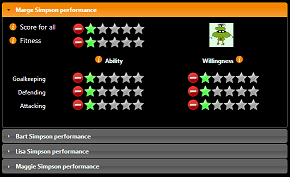
We'll remember your player ratings each time so you don't have to vote for everyone every time!
Whilst it's nice to thrash the opposition 10-1 now and again; at the end of the day we're all chipping in to pay for the pitch, so we should aim for everyone to have a good game. So help your manager by telling them who works hard and who's just a poacher.
Posters

- Would you love to be playing football more often?
- Can't get enough players together?
- Need to get the word out about your matches?
Download a poster to advertise your squad at work*, or where you play* and get the word out!
Your poster will tell [potential] players where you play, when and who to contact.
As a bonus you'll be helping promote the website so others can lose the faff!
* Naturally we'd advise asking them for permission first 😊!
Private Squads
Public Squads
Managers can elect to have their squad public or private. Public means that the squad is visible on the internet for people to join your squad.
Naturally anyone wishing to join your squad would have to get permission from the manager first!
Regular Collector
Sadly, playing football isn't free; Typically there's someone who collects the cash together to pay for the pitch.
On toepoke this very kind and thankless task is carried out by the Collector.
A regular collector is assumed to be the collector of the monies, if one is setup.
If your players pay their share directly to the venue you won't have a regular collector.
Regular Matches
As well as occasional matches, toepoke really comes into it's own when organising regular matches.
Just tell the website that you play every week, or every month and we'll invite your squad appropriately. Great if you play at the same place and time every week, or have a block booking.
Reminder
A reminder is kind of what it says on the tin! When organising a game you need to do certain things at certain times. For instance if your game is on a Thursday night, toepoke will:
- Invite everyone the Friday before.
- Remind anyone on Tuesday the match is on (if they haven't already put their name down).
- Tuesday afternoon, remind the manager to send the teams out.
- And of course remind you to book the pitch for the following match.
Reminders are just one way toepoke loses the faff.
Running Matches
Season
Play a small season every 5, 10 or 15 weeks. Marvel at your p3 votes; Brag about your goal scoring prowess and follow your form.
Play your own Premier League!
Secondary Email
To ensure you never miss out and what's happening in your game, you can regsiter a second email address. This can be useful to receive communications both at your work and home email addresses.
Your secondary email address follows any email preferences you have configured.
You can only use your main email address for signing into the website.
Small Sided Football
small sided football is a collective term for 5-a-side, 6-a-side, 7-a-side ... well basically anything under 11-a-side.
Squad
Your squad is a list of everyone who's gets an invite to your matches.
Suspended
Your account can become suspended if there is a problem with your e-mail address. We actively monitor errors that come from e-mail servers flagging problems with accounts of our users.
Often these are temporary problems, like an out-of-office alert has been created whilst someone is on holiday. Sometimes the issue can be a little more permanent, for instance:
- There's a typo in the e-mail address
- The e-mail account has been closed (when someone moves jobs for example)
- The e-mail server of their ISP is rejecting the e-mail
Whatever the reasons it's not good for toepoke to continue to send an e-mail to an unresponsive account. For this reason we may mark an account as suspended whilst issues with the e-mail address are resolved.
If your account is suspended, we'll try our best to have someone in your squad tell you by some other reliable means, so you know the problem exists.
We've tried to make it as simple as possible to fix.
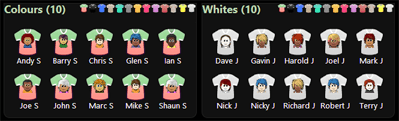
Team sheet
Testing
Venue
Where your football games are played.
The venues we show are taken from Google Places and venues provided by our community.
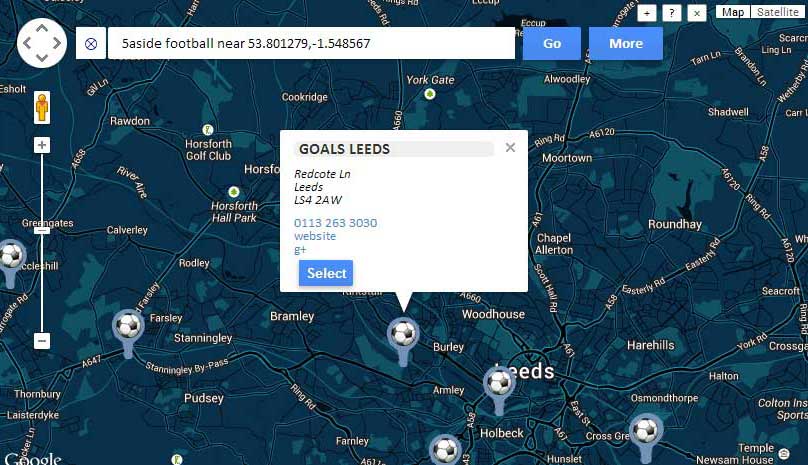
If you can't a venue near you, the Football Foundation Pitch Finder is an excellent resource, or try a local school, who often hire out their facilities after school hours are over.